Get started with IDOML platform
Once the IDOML platform is deployed, you can access the dashboard and start using the platform. The following sections provide an overview of the platform and how to get started.
Consulting Dashboard
The dashboard can be accessed at the following URL:
Where IDOML_DOMAIN is the domain name that is set up in the .env file.The dashboard is the main interface of the IDOML platform. It provides access to the following services:
- Apache airflow: A platform to programmatically author, schedule, and monitor workflows.
- Minio storage: An object storage server compatible with Amazon S3 cloud storage service.
- Jupyterhub server: A multi-user server for Jupyter notebooks.
- IDOML MLflow server: An open-source platform to manage the ML lifecycle, including experimentation, reproducibility, and deployment.
Concepts
The goal of this platform is to facilitate the development and deployment of machine learning models from experimentation to production.
- The experimentation phase involves data exploration, model development, and model evaluation which are designed to be done in the Jupyterhub server.
- The production phase involves model deployment, monitoring, and management, with which the executions are designed to be managed by the Apache Airflow server.
Apache airflow is a powerful tool that runs the workflows defined in the form of Directed Acyclic Graphs (DAGs). Each DAG is a collection of tasks that are executed in a specific order. The tasks can be Python functions, bash commands, or any other executable code. The DAGs can be scheduled to run at specific intervals or triggered by specific events. Although the data scientists can manage to write the customized DAGs for their machine learning pipelines, the IDOML platform provides an Elyra extension to Jupyerlab that allows the data scientists to create the DAGs graphically within an interactive environment.
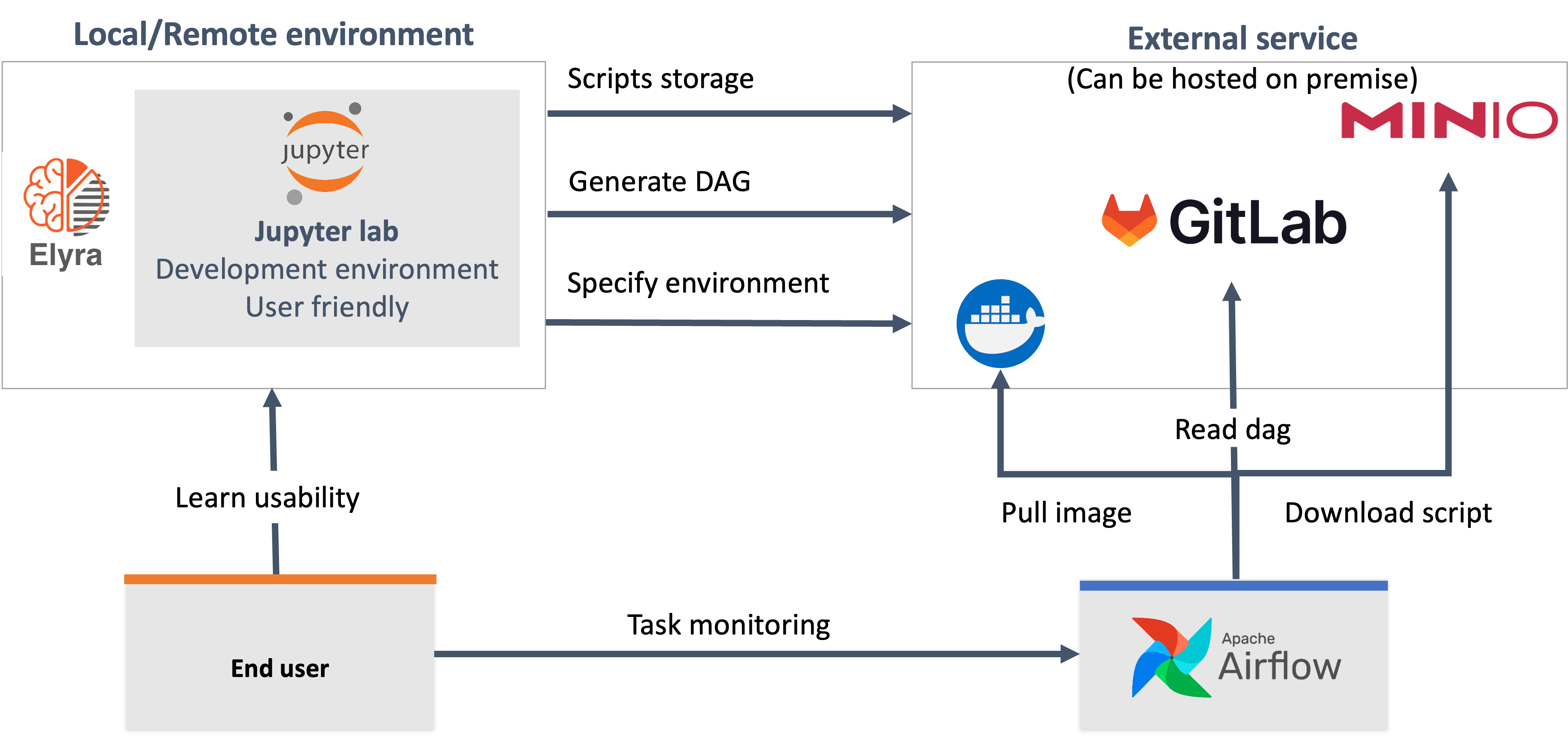
The idea is to provide a seamless experience for the data scientists to develop and deploy their machine learning models without worrying about the infrastructure and the deployment process. When data scientists are ready to deploy their models, they can use the Elyra extension to create the DAGs and submit them to the Apache Airflow server. The Apache Airflow server will then execute the DAGs and manage the workflow. Here is a high-level overview of the process:
- The data scientists will develop and test their models in the Jupyterhub server,
- The data scientists will create the DAGs using the Elyra extension,
- The data scientists will submit the DAGs using the Elyra extension,
- The Elyra extension will send the DAGs to the git repository,
- The Elyra extension will send the Machine Learning scripts to the Minio storage,
- The Apache Airflow server will synchrnoize the DAGs from the git repository,
- The DAGs generated by the Elyra extension will download the Machine Learning scripts from the Minio storage, then execute the scripts in the Apache Airflow server.
Next steps
In the next step, you need to configure the user specific settings and credentials for the platform. The following settings need to be configured:
- Minio credentials
- Tokens for git providers
- IDOML runtime (Elyra) for the first time