Expected workflow
We will explain the expected workflow only for data scientists in this section, as the system administrator and project manager are not the primary users of the IDOML platform. An illustration of the workflow is shown in the following diagram:
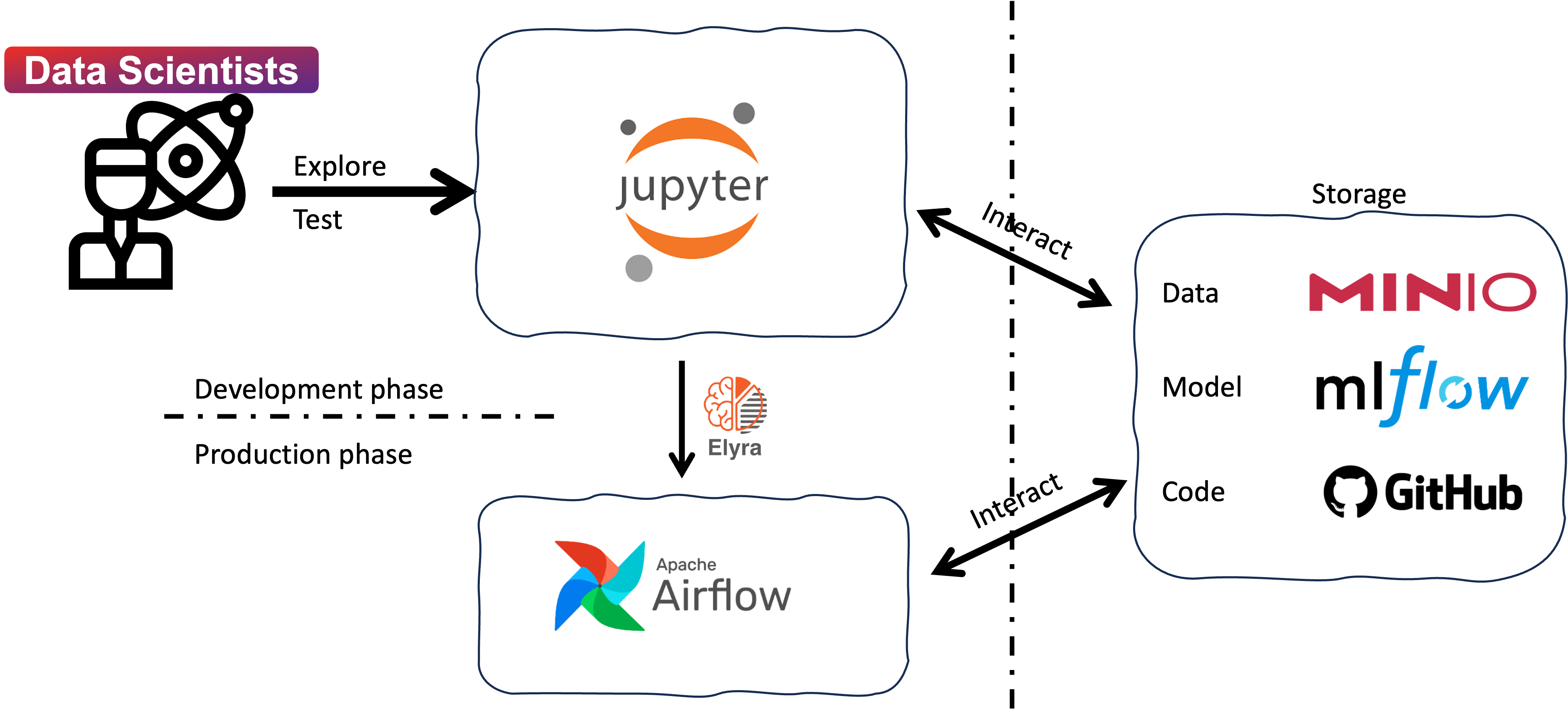
Briefly, the workflow consists of the following steps:
- Develop and test machine learning models: Data scientists can explore, develop, and test machine learning models in the JupyterHub server. The JupyterHub server provides a collaborative environment for data scientists to work on their projects and share their work with others.
- Create ML Pipeline with Elyra extension: Data scientists can create machine learning pipelines with the Elyra extension in JupyterLab. The pipeline is defined as a Directed Acyclic Graph (DAG) that specifies the workflow of the machine learning pipeline. The Elyra extension simplifies the process of creating and managing machine learning pipelines, making it easier for data scientists to develop and deploy machine learning models.
- Submit the DAGs to the Apache Airflow server: Data scientists can submit the DAGs to the Apache Airflow server for execution. The Apache Airflow server runs the workflows defined in the DAGs, executing the tasks in a specific order. The tasks are organized with docker containers, which makes it easy to manage the dependencies and the execution environment. The DAGs can be scheduled to run at specific intervals or triggered by specific events.
- Monitor the execution of the DAGs: Data scientists can monitor the execution of the DAGs in the Apache Airflow server. The Apache Airflow server provides a web-based interface for monitoring the status of the tasks and the progress of the workflows. The execution logs are stored in minio storage, which can be accessed by the data scientists for debugging and troubleshooting.
For more details, please refer to the IDOML user documentation.